
Lyrics and pronunciation
User guideMake these detailed changes in MIDI Lab → Lyrics & pronunciation…, after importing music and selecting melody tracks for the voices.
How do I add lyrics to an existing melody?
Import MIDI, enter lyrics and choose their language. Select a singer and melody track for Voice 1. Disable the second voice if unwanted. Click Apply voices and listen.
How do I correct a word's pronunciation?
Check the language, spelling and accents first. Open Lyrics & pronunciation… and select the syllable. Open Phoneme help, use its examples in Phonemes, and click Set. Listen to the line. Help explains 49 codes and symbols, follows the lyric language when a translation exists, and otherwise uses English. Pay attention to letter case and the language of each foreign example.
How do I stretch a syllable over more notes?
Select the syllable and increase Notes. For example, 3 spreads it over three consecutive melody notes. Listen and adjust until it fits.
How do I put two syllables on one note?
Select adjacent syllables with Shift or Ctrl, then click Join. Select the group and click Split to undo a join. On a single syllable, splitting separates sounds where possible, for example j a → i | a. Otherwise it adds an empty □ cell on the right and selects it: enter Phonemes and click Set. To remove an empty cell, select it and click Join. Empty cells are not sung but use their assigned notes. The written lyrics stay unchanged.
How do I hear just the line I am correcting?
Select the line and singer and use the line preview. Use the music preview to hear only its melody. The unprocessed preview lets you compare the original voice without added effects.
How do I apply corrections to the song?
Click Apply voices inside the editor. If you close the window after editing, the program asks whether to update the voices. Choose Yes to hear the changes in the full arrangement.
On screen: Lyrics and pronunciation
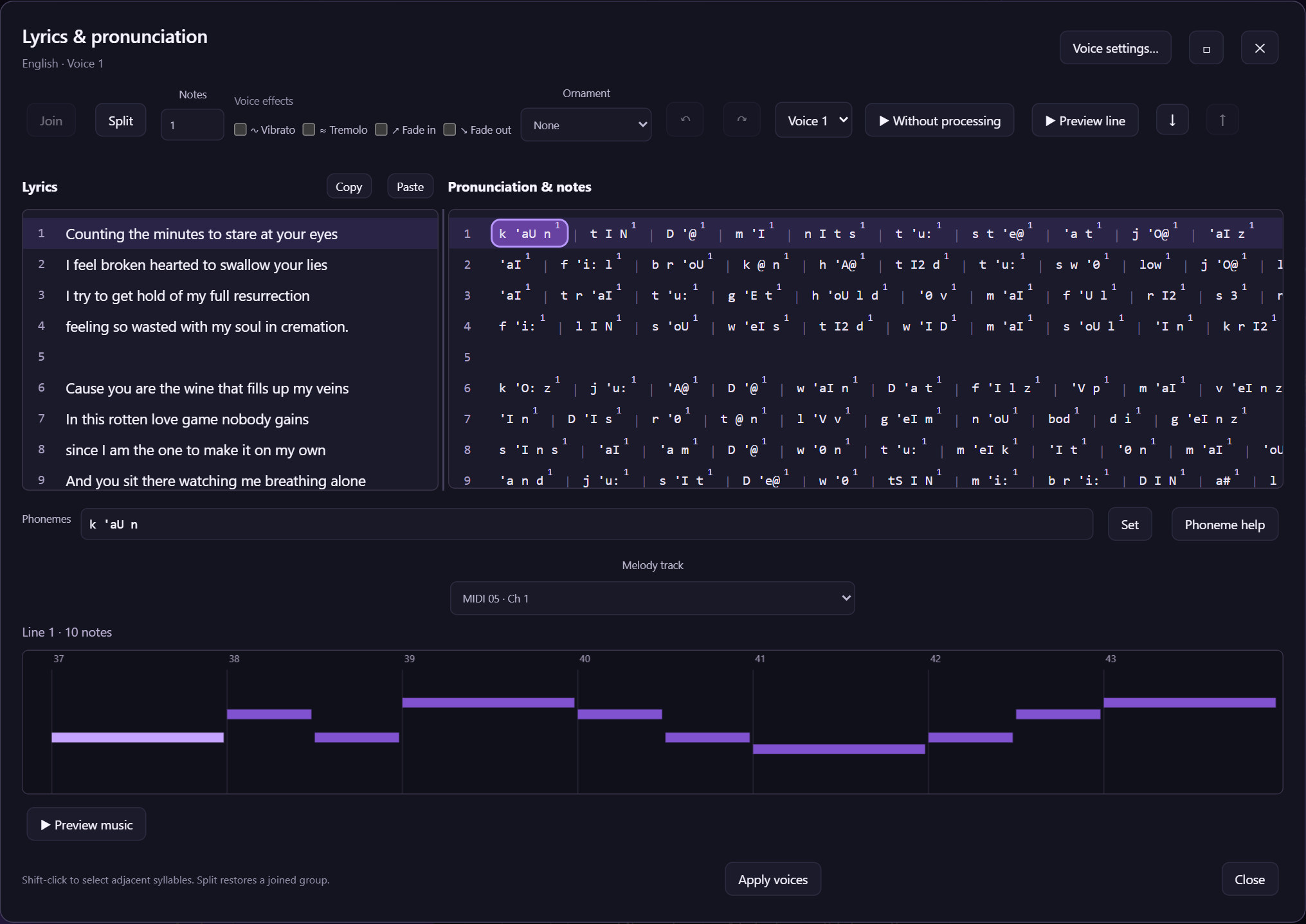
Figure 7. Lyrics are on the left and syllables on the right. The selected syllable has a purple outline.
- Notes sets the number of melody notes used by the syllable.
- Join / Split changes how syllables fit the melody.
- Line preview: listen to the part you are editing.
- Phonemes / Phoneme help helps you correct pronunciation using examples.
- Apply voices updates the song with your edits.
How do I copy a chorus with pronunciation edits?
Select complete lines and click Copy. Put the cursor on a new line and click Paste. Within the same Studio session, pronunciation edits and syllable-to-note assignments are copied too.