
Post-processor: setup and commands
User guideThe post-processor translates calculated paths and operation settings into the commands expected by the machine controller.
Choose and edit a post
Choose the process before creating operations. The supplied Laser XY, Waterjet XY, Plasma XYZ and Router XYZ templates are starting points; Router also has an inch template. They are not certified profiles for every machine. Match units, axes, power/spindle commands and clearance heights to your controller.
Import .gpp loads a Gardos post. Import Vectric .pp converts supported definitions; review all diagnostics and the resulting .gpp, because not every Vectric feature is supported. Edit post opens the editor. Validate checks the syntax and produces a 10 mm square sample. Apply uses the valid post in the job. Save as writes a separate .gpp copy; export and generated sample text require activation. Save the project to retain its post settings.
After any post change, inspect existing operation values and calculate again. A successful Validate checks the post syntax, not the suitability of every command for your machine. Plasma templates do not configure probing or torch height control; the router template assumes a fixed tool and does not implement automatic tool changes.
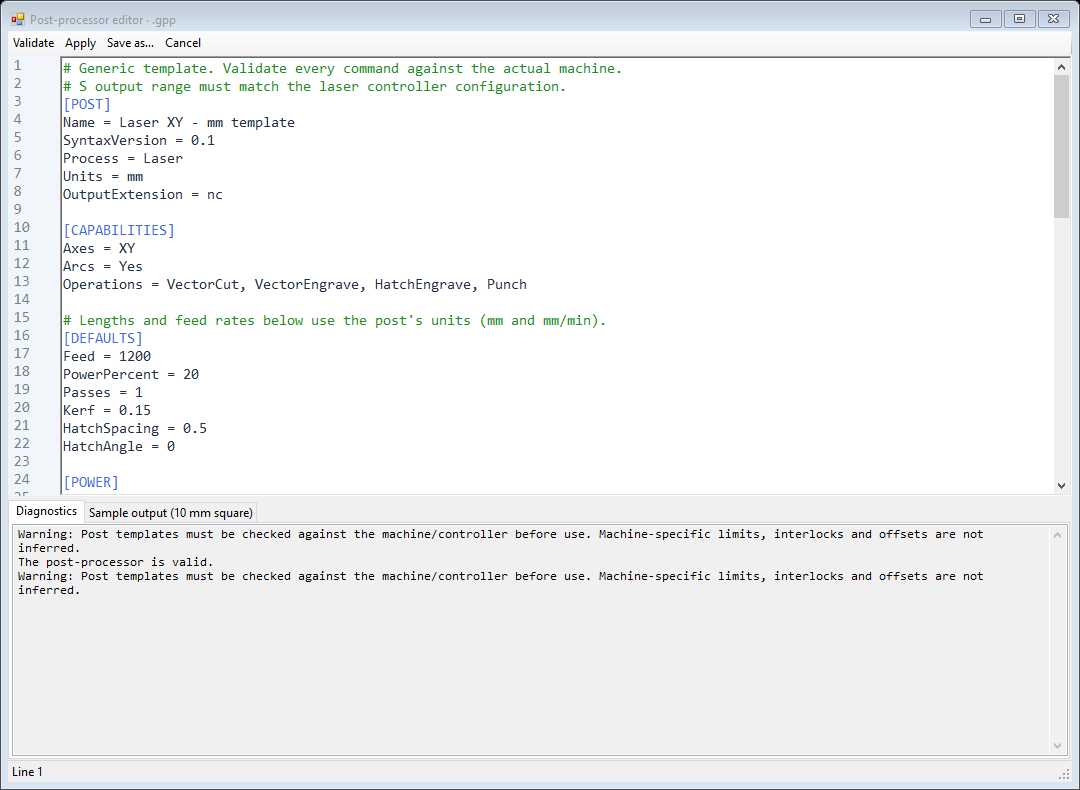
How a .gpp is organized
Sections use [BRACKETS]. Settings use Key = Value. A line beginning with # is a comment. Command sections contain the text to output; values in {BRACES} are replaced automatically. Keep section names, keys and variable names exactly as shown, regardless of interface language.
| [POST] | Name: display name. SyntaxVersion = 0.1. Process = Laser, Plasma, Waterjet or Router. Units = mm or inch. OutputExtension = nc, for example, without a dot. |
| [CAPABILITIES] | Axes = XY or XYZ; Router requires XYZ. Arcs = Yes or No. Operations is a comma-separated list of supported operation names. Profile/Pocket require Router. |
| [DEFAULTS] | Initial operation values. Lengths and feed rates use the post units and units/min. Review actual operation settings after importing a different post. |
| [POWER] | OutputMin/OutputMax map PowerPercent to POWER_S. With 0..1000, 20% produces S200. Match this range to the controller. |
| [FORMAT] | CoordinateDecimals, FeedDecimals, PowerDecimals: decimal places (0..8). DecimalSeparator = . only. LineEnding = CRLF or LF. LineNumberStart/Increment/Maximum control {LINE_NUMBER}; add N{LINE_NUMBER} where needed. |
Operation defaults
| Feed / PlungeFeed | Cutting feed / Z plunge feed. |
| PowerPercent / SpindleSpeed | Process power percentage / spindle speed. They drive different S variables. |
| SafeZ / CutZ | Clearance height / final cutting Z. SafeZ must be above CutZ. The router template uses stock-surface Z0 and negative cutting depths. |
| PierceZ / PierceDelay | Plasma piercing height / delay. The template writes G4 P for the delay; verify the controller’s P time unit. |
| Kerf / ToolDiameter | Cut width for compensation / cutter diameter for router calculations. |
| HatchSpacing / HatchAngle | Distance between hatch lines / hatch direction in degrees. |
| Passes / StepDown | Repeated passes for XY/Punch / maximum depth increment for milling. |
| ToolNumber | Tool identifier available as {TOOL_NUMBER}. Setting it alone does not add a tool-change command. |
When command sections run
| [PROGRAM_START] / [PROGRAM_END] | Once at program start/end: units, positioning mode and shutdown. |
| [OPERATION_START] / [OPERATION_END] | Optional hooks around each generated path/pass, not just once per item in the operation list. |
| [RAPID_MOVE] | Position at the next start with X/Y. Also used for the optional final return. |
| [PATH_START] / [PATH_END] | Enable/disable the process around a contour, for example M3/M5. Plasma may include piercing here. |
| [PLUNGE_MOVE] / [RETRACT_MOVE] | Required for XYZ: descend at plunge feed and retract to SafeZ before travel and after a contour. |
| [FIRST_LINEAR_MOVE] / [LINEAR_MOVE] | Optional special first straight move, then ordinary straight moves. Without FIRST_LINEAR_MOVE, LINEAR_MOVE handles all. |
| [ARC_CW] / [ARC_CCW] | Clockwise G2 / counterclockwise G3. Required when Arcs = Yes; each section contains one arc command. |
| [PUNCH] | Required when Punch is offered. Replaces PATH_START, plunge, cutting moves and PATH_END for a punch point. Usually outputs {PUNCH_COMMAND}. |
The six base command sections are PROGRAM_START, RAPID_MOVE, PATH_START, LINEAR_MOVE, PATH_END and PROGRAM_END. Add the XYZ, arc and Punch sections required by your capabilities. Typical XY sequence: start program -> rapid -> process on -> cutting moves -> process off -> next path -> end program.
Variables inserted in commands
| {X} {Y} {Z} | Absolute destination coordinates in the selected output units. |
| {I} {J} | Arc-center offsets from the arc start, along X/Y. Only in arc sections; these are not absolute center coordinates. |
| {FEED} {PLUNGE_FEED} | Cutting/plunge feed, converted to output units per minute. |
| {POWER_S} {POWER_PERCENT} | Mapped S value / original percentage. Prefix POWER_S with S where required. |
| {SPINDLE_SPEED} {TOOL_NUMBER} | Spindle speed / tool number from the operation settings. |
| {SAFE_Z} {CUT_Z} | Safe height / current path Z, including the current depth pass. CUT_Z follows that path, not always the final depth. |
| {PIERCE_Z} {PIERCE_DELAY} | Piercing height / delay value for the plasma sequence. |
| {PATH_INDEX} {LINE_NUMBER} | Path/pass counter starting at 1 / configurable output line number. Numbering needs an N prefix in the template. |
| {UNITS_CODE} | G21 for millimeters or G20 for inches. Prefer this variable to a fixed units command; check the job units before export. |
| {PUNCH_COMMAND} | The punch command configured in the operation. It is not a universal command for every punching machine. |
G-code commands used by the templates
| G0 / G1 | Rapid positioning / straight movement at feed F. X/Y/Z specify the destination. |
| G2 / G3 | Clockwise / counterclockwise circular motion in XY; I/J locate the center relative to the start. |
| G17 / G90 / G91.1 | XY plane / absolute X/Y/Z / incremental I/J arc centers. G91.1 does not make X/Y incremental. Ordinary G91 is unsupported. |
| G20 / G21 / G94 | Inches / millimeters / feed in units per minute. F1200 under G21/G94 means 1200 mm/min. |
| M3 / M5 / S | Templates use M3 to enable spindle/process and M5 to disable it. S sets spindle speed or mapped process power. Exact laser/torch behavior depends on the controller. |
| G4 P / M2 | Dwell with a P value / program end. Confirm P time units and supported end codes in the controller manual. |
Example: from template to movement
[LINEAR_MOVE]
G1 X{X} Y{Y} F{FEED}

G1 X48.000 Y40.000 F1200.0
The first two lines define a post section. The last line illustrates its output for a destination of (48,40) and feed 1200 in a millimeter job. The braces disappear; the actual coordinates and feed are inserted. This excerpt is not a complete machine program.
Arcs and full circles
With Arcs = Yes, provide ARC_CW and ARC_CCW with X/Y/I/J/FEED and also Z for XYZ. PROGRAM_START must contain G17 and G91.1. Only XY arcs with incremental I/J are supported; radius R format, other planes and absolute arc centers are not supported. Settings > Curve output chooses arcs or G1 segments. Full circles use two semicircles. Arcs = No causes linear fallback.
For a circle of radius 10 centered at (0,0), starting at (10,0), the two example G3 moves below return to the start. Each I/J pair is measured from the start of that particular semicircle. Check that your controller supports the declared arc-center mode; if it does not, use line segments and a suitable line-only post.
G21
G90
G17
G91.1
G94
G0 X10.000 Y0.000
G3 X-10.000 Y0.000 I-10.000 J0.000 F1200.0
G3 X10.000 Y0.000 I10.000 J0.000 F1200.0
This is a geometry example, not a production-ready program: process start/stop and machine setup are intentionally outside the excerpt. The controller manual is the authority for supported commands. Reference definitions: LinuxCNC G-codes and M-codes, https://linuxcnc.org/docs/stable/html/gcode/g-code.html and https://linuxcnc.org/docs/stable/html/gcode/m-code.html . Using these references does not make a template a verified LinuxCNC machine profile.